


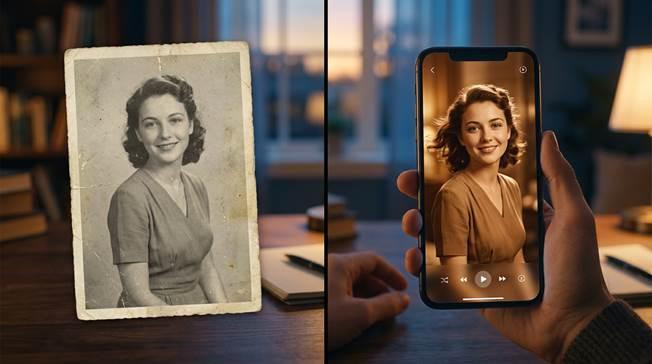
AI photo animation is changing the way people experience images. Instead of leaving portraits, family archives, and meaningful snapshots frozen in time, users can now transform them into short moving memories that feel more emotional and immersive. What once required advanced editing skills is becoming a simple mobile workflow powered by image analysis, facial landmark recognition, and motion generation.
This shift matters because many of the most valuable photos are not technically perfect. They may be old, faded, low resolution, or emotionally powerful in ways that a still frame cannot fully express. That is where photo animation becomes useful. It does not replace the original image; it extends its storytelling power. For users who want a mobile-first tool that can both animate modern portraits and animate old photos, Wondershare Relumi is one of the most relevant options to explore.
Part 1. What AI Photo Animation Actually Does
Part 2. Why People Want to Bring Photos to Life
Part 3. How Wondershare Relumi Fits the AI Photo Animation Workflow
Part 4. Step-by-Step Screenshots for the Animate Photo Feature
Part 5. Best Use Cases for AI Photo Animation in 2026
Part 1. What AI Photo Animation Actually Does
AI photo animation works by analyzing a still image and predicting what kinds of motion can be added without breaking realism. A good tool studies facial structure, body posture, lighting direction, and the emotional tone of the original picture. It then generates subtle movement that makes the image feel alive rather than artificially altered. This is why the best results are often small, such as a gentle smile, slight head motion, or a soft natural gesture.
The category has matured because users now expect more than a gimmick. They want believable motion, not distortion. They also want flexible use cases, from old family portraits and pet photos to profile images and creator visuals. As the technology improves, the gap between static memory and moving memory becomes much smaller.
Part 2. Why People Want to Bring Photos to Life
There are emotional and practical reasons behind the popularity of AI photo animation. Old family albums contain moments that people want to reconnect with. A childhood portrait or wedding photo may have strong emotional meaning, but the still image can feel distant. Animation helps close that emotional distance by creating the sensation that the subject is present again, even if only for a few seconds.
The same logic applies to modern content creation. Social media audiences respond more strongly to dynamic visuals than static uploads. A moving profile asset, animated memory clip, or short shareable photo-to-video output naturally attracts more attention. That makes AI photo animation useful not only for personal memory work but also for digital storytelling and engagement.
Part 3. How Wondershare Relumi Fits the AI Photo Animation Workflow
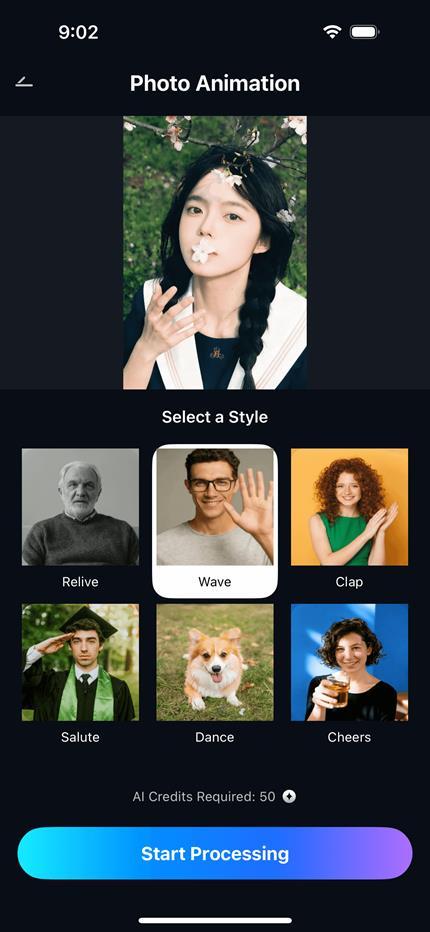
Wondershare Relumi is especially relevant to this topic because its Photo Animation feature is built around the idea of bringing still images back to life in a natural way. According to the product messaging, Photo Animation adds natural movement to portraits, supports 4K quality AI animation, uses realistic facial micro-expressions, and allows users to bring old family photos to life or create animated avatars. Motion styles such as Wave, Clap, Cheers, and Dance help users match the mood of the memory.
This matters because animation works best when it feels emotionally appropriate to the source image. For an old family portrait, gentle motion may be the right choice. For social content or playful pet imagery, a more energetic style can work. That flexibility is one reason the feature is well suited to an article about how to bring photos to life rather than simply how to add movement.
Key Reasons Relumi Works Well for Photo Animation
First, the workflow is easy to understand. Users upload a picture, choose an animation mode, and preview the result. Second, the feature is broad enough to cover modern portraits, pet images, and old family photographs in the same app. Third, the final output is designed to be shareable, which makes the tool practical for both memory preservation and content publishing.
Another strength is that the product messaging is already built around emotional storytelling. Official descriptions emphasize bringing memories to life, adding natural movement, and preserving the feel of the original moment. That positioning fits well with outreach content that needs to sound helpful and human rather than overly technical.
Part 4. Step-by-Step Screenshots for the Animate Photo Feature
The screenshots below follow the animate photo feature itself and are suitable for a guide-style external article. Each one is paired with a direct image link so the visual source remains clear for later editorial reuse.
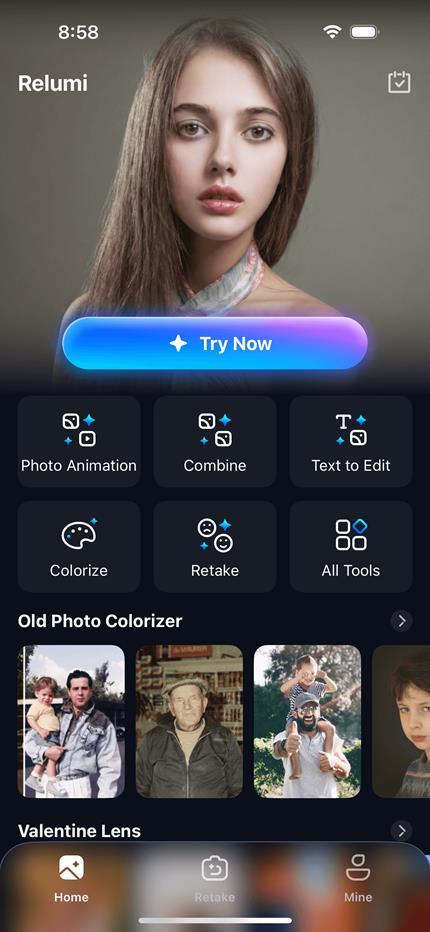
Step 1. Add Your Photo to Start the Animation Workflow
The process begins by uploading a still image into the animation workflow. This is where AI photo animation becomes practical for everyday users, because a single portrait, pet image, or family memory can move from static to expressive without manual video editing. For readers exploring how to bring images to life, the first lesson is simple: better input selection creates more believable motion.

Step 2. Choose the Photo Animation Mode and Let AI Analyze the Image
After the image is uploaded, users select the animation mode and let the AI read face structure, subject position, lighting, and movement potential. This step is what separates a modern photo animation experience from older novelty effects. Instead of applying random motion, the tool generates movement that feels emotionally consistent with the original picture.
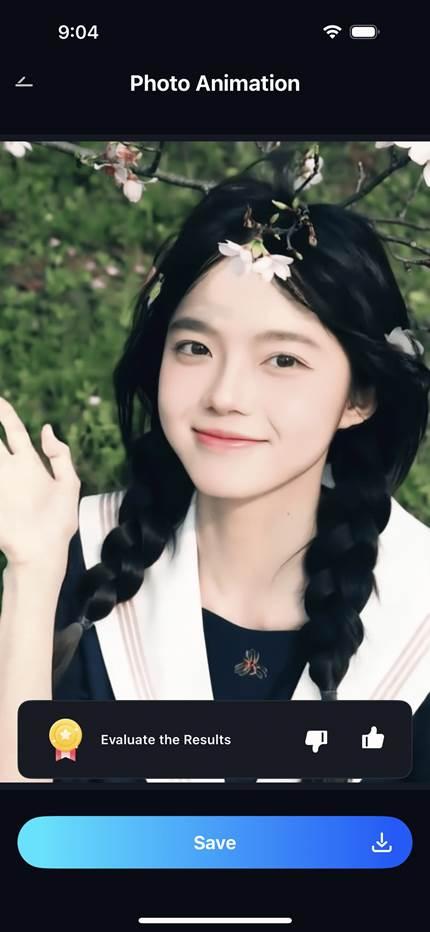
Step 3. Preview, Save, and Share the Animated Result
The final stage is previewing and exporting the result. This matters because the strongest animated photos do not just move; they remain respectful to the original memory. Users can check whether the motion feels natural, then save the output as a shareable clip for social content, memorial storytelling, or personal keepsakes.
Part 5. Best Use Cases for AI Photo Animation in 2026
AI photo animation is most valuable when the image carries emotional or communicative weight. Old family portraits are a natural fit because they can be transformed into moving keepsakes. Pet images also work well because small gestures or head movements make personality feel more immediate. For creators, animated portraits and profile visuals add novelty and stronger visual impact without requiring video production skills.
There is also a memorial use case that deserves respectful mention. Some people want to revisit photos of loved ones through subtle movement that feels gentle rather than exaggerated. In that situation, animation is not about spectacle. It is about preserving memory in a more vivid form. This is where natural motion design matters most.
Quick Comparison: When AI Photo Animation Works Best
| Photo Type | Why Animation Helps | Best Outcome |
| Old family portrait | Adds emotional closeness to historical memories | A respectful moving keepsake |
| Pet photo | Highlights personality and playful expression | A more shareable social clip |
| Selfie or profile image | Makes the image more dynamic and attention-grabbing | A stronger creator or social asset |
| Memorial photo | Creates gentle motion that feels personal and reflective | A more vivid remembrance piece |
Conclusion
The ultimate value of AI photo animation is not just that it makes pictures move. It changes how people relate to still images by giving them motion, presence, and stronger emotional impact. For users trying to bring portraits, pet photos, or old memories to life, the best tools are the ones that keep movement natural and the workflow simple. That is why Wondershare Relumi fits naturally into this topic: it turns the idea of bringing photos to life into a practical, mobile-friendly experience.