
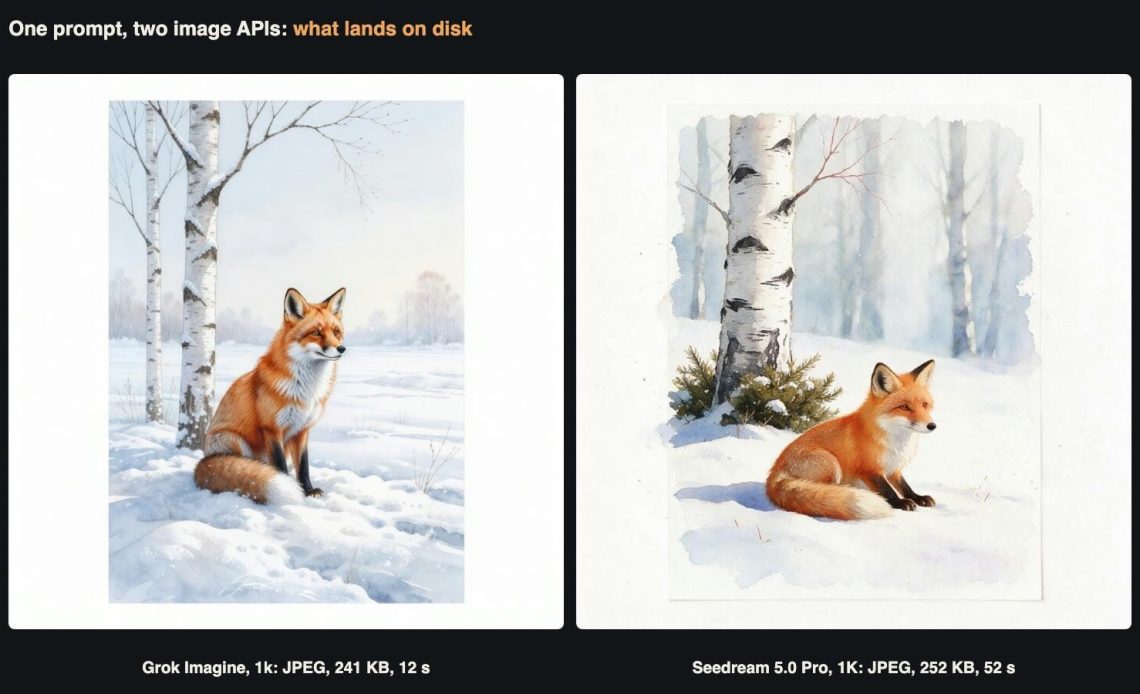
The same prompt sent to both models at their smallest square size. Both came back as 1024 x 1024 JPEGs of about 250 KB. That is where the similarities ended.
Most writing about image generation APIs stops at the picture. People who store, share and serve files care about what comes after it: the format that actually arrives, how many pixels sit behind a label like “2k”, how heavy the file is, what is hidden inside it, and how a batch of results should be named, checked and packed for download. Those details decide your storage bill and your page weight. They also decide whether a customer’s download looks tidy or arrives as a folder of files called image_0.jpg.
We tested those questions on two image models, grok-imagine-image and seedream-5-0-pro. Our scenario is Fernhollow Classroom Packs, a two-person business we invented for this article. Fernhollow sells downloadable picture-card packs to primary school teachers: nature illustrations, habitat posters and drawing sheets, delivered as ZIP files. Every card in a pack is now drafted with an image API. The owners wanted to know what lands on their disk before they built the pipeline around it.
We ran nine tests: 27 completed generations and two requests the API rejected before any work started. The total generation cost was $0.65. All file sizes, pixel counts, formats and timings below were measured from the downloaded files or read from our own request logs. Neither API takes a seed in these tests, so each request draws a new picture. Treat single-image numbers as examples, not averages.
The walkthrough
The video covers the main findings in under three minutes.
How the two APIs are called
Both models use the same asynchronous pattern. You send a POST to /v1/images/generations and get back a task ID. Then you poll GET /v1/tasks/{task_id} until the status is completed, and read the file URLs from result.images. Only model and prompt are required. The two models differ in their optional fields, and those differences matter for files:
- Grok Imagine takes
aspect_ratio(auto plus 13 ratios),resolution(1kor2k),nfrom 1 to 10, and up to five reference images inimage_urlsfor editing. There is no output format field. - Seedream 5.0 Pro takes
size(a ratio,auto, a tier or exact pixels),resolution(1K,1.5Kor2K),output_format(jpegby default, orpng), up to ten reference images, and some extras: awatermarkswitch and layer decomposition. It produces one image per request.
Our account was charged $0.0144 per Grok Imagine image at either resolution. Seedream 5.0 Pro cost $0.0263 at 1K and 1.5K and $0.0527 at 2K. These match the lowest member tier on the model pages. The entry tier listed there is $0.016 and $0.0293 or $0.0585, so your numbers may differ slightly. Failed tasks are not charged. We also confirmed that both rejected requests below created no task and no charge.
Test 1: What a default request returns
We sent one watercolour prompt to both models at every square tier:
Watercolour illustration of a red fox sitting in fresh snow beside a birch tree, soft paper texture, white margin around the scene, for a printable classroom picture card. No text.
Grok Imagine ran at aspect_ratio: "1:1" with resolution set to 1k and 2k. Seedream 5.0 Pro ran at size: "1:1" with 1K, 1.5K and 2K. We identified each file’s real format from its first bytes, not from the URL extension. In every case the two agreed.
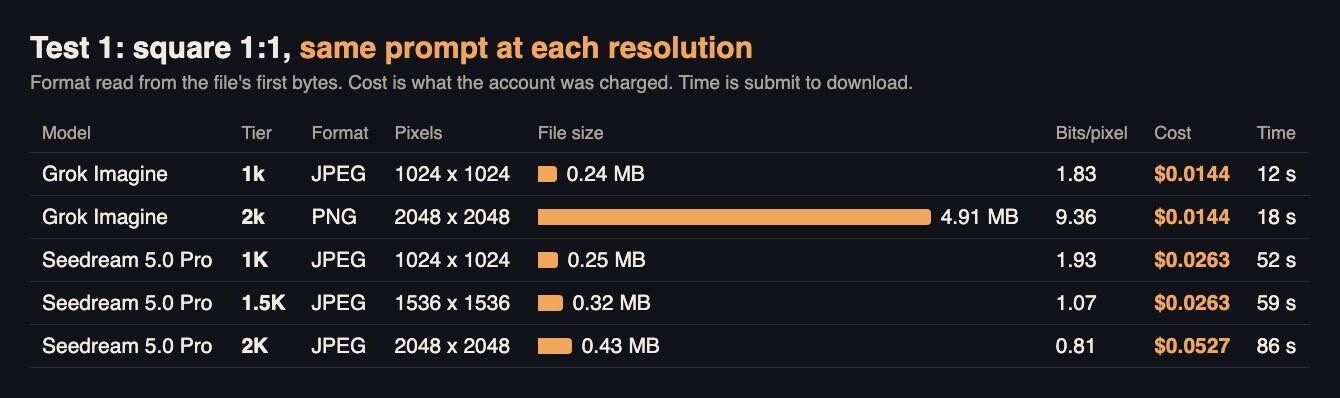
Grok’s 2k file is more than eleven times the size of Seedream’s 2K file at the same pixel count. The difference is format, not detail.
The biggest finding came first. Grok Imagine changed format with resolution. At 1k it returned a JPEG, 1024 x 1024 and 241 KB. At 2k it returned a PNG, 2048 x 2048 and 4.91 MB, at the same price. We saw the same pattern in every Grok request in this article: all 1k results were JPEG and all 2k results were PNG. If your storage plan assumes JPEG-sized files, every 2k Grok image breaks it by an order of magnitude.
Seedream 5.0 Pro returned JPEG at all three tiers, because that is its default. The files were 252 KB at 1K, 316 KB at 1.5K and 425 KB at 2K. Notice how little the size grows: four times the pixels added only 69% more bytes. Part of the reason is in Test 4, and it has nothing to do with the image.
The two models also compress differently. We read the quantisation tables of the JPEGs. Grok’s tables averaged 5.8 and Seedream’s averaged 29, which means Seedream compresses harder. For Fernhollow, Seedream’s 2K JPEG at 425 KB is already lighter than many hand-exported cards, while Grok’s 2k PNG needs re-encoding before it goes anywhere near a download pack.
Speed differed just as clearly. The Grok square images took 12 and 18 seconds from submit to download. The Seedream ones took 52, 59 and 86 seconds.
Test 2: The pixels behind each ratio label
Fernhollow sells posters (wide), phone wallpapers (tall) and cards (3:4). Resolution labels are not pixel counts, so we requested a pond habitat illustration at several ratios and measured each file:
Flat illustration of a pond habitat cross-section: lily pads, a frog, two dragonflies, reeds at the edge and small fish below the surface. Clean shapes, bright colours, no text, no labels.
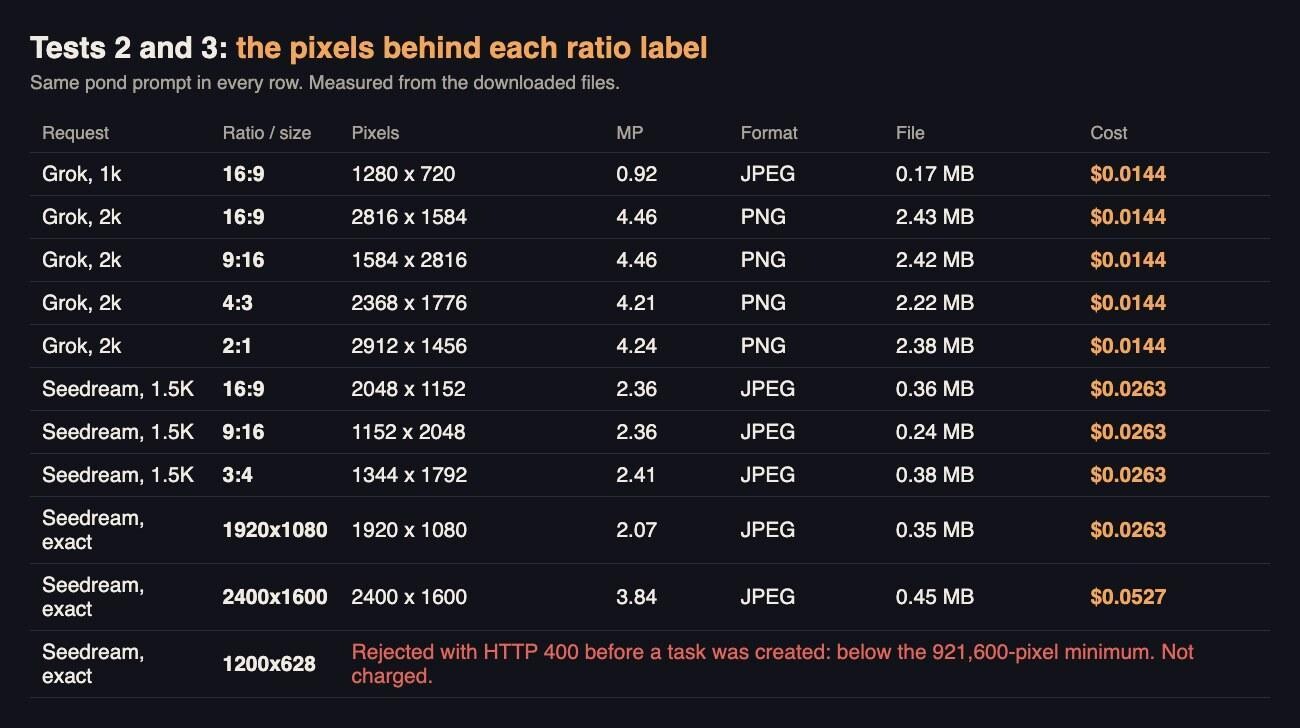
Grok’s 2k tier is a pixel budget of about 4.2 to 4.5 megapixels, whatever the shape. Seedream’s 1.5K tier is about 2.4.
Grok’s “2k” does not mean a 2048-pixel edge. A 16:9 image came back at 2816 x 1584, 9:16 at 1584 x 2816, 4:3 at 2368 x 1776 and 2:1 at 2912 x 1456. All of them land between 4.2 and 4.5 megapixels. They were all PNG, between 2.2 and 2.4 MB. Grok’s 1k at 16:9 was 1280 x 720, a 0.92-megapixel JPEG of 174 KB.
Seedream 5.0 Pro matched its documented table to the pixel. At 1.5K, 16:9 gave 2048 x 1152, 9:16 gave 1152 x 2048 and 3:4 gave 1344 x 1792, all about 2.4 megapixels and all JPEGs between 236 and 377 KB.
Two practical points follow. First, record the real pixel size in your file name or manifest, because the request label will not tell you. A teacher printing a 2k Grok poster at 300 pixels per inch gets about 24 cm of width, not 17. Second, the same label means different things on the two models. “2k” on Grok holds roughly the pixels of Seedream’s 2K square. Seedream’s 1.5K wide frame holds about half as many.
Test 3: Exact pixel sizes
Seedream 5.0 Pro also accepts an exact size such as 1920x1080. The pixel count must fall between 921,600 and 4,624,220. That is useful when a template needs fixed dimensions, such as a slide background or a banner. We sent three exact sizes with the pond prompt.
1920x1080: returned exactly 1920 x 1080, a 348 KB JPEG, charged $0.0263, the same as the 1K tier.2400x1600: returned exactly 2400 x 1600, 450 KB, charged $0.0527, the 2K price. At 3.84 megapixels it is above the 1.5K band, so it is billed as 2K.1200x628, a common social sharing size: rejected immediately with HTTP 400. The message said the total was 753,600 pixels, below the minimum. No task was created and nothing was charged.
The 1920 x 1080 result is worth noting. For the 1K price you get a full HD frame with no resizing step. For small sizes like 1200 x 628, request the smallest valid frame with the same ratio and scale it down yourself. Grok Imagine has no exact-size option, so its output always needs resizing for fixed slots.
Test 4: What is inside the file besides the picture
File size in Test 1 did not track pixel count, so we walked the internal structure of every file. Both models embed C2PA Content Credentials: a signed manifest stating how the file was made. In the JPEGs it sits in APP11 segments, and in the PNGs in a caBX chunk. Both manifests declare the digital source type trainedAlgorithmicMedia, the standard label for AI-generated media. The Grok manifest names Grok Imagine as the software agent. The Seedream manifest also carries a thumbnail claim.
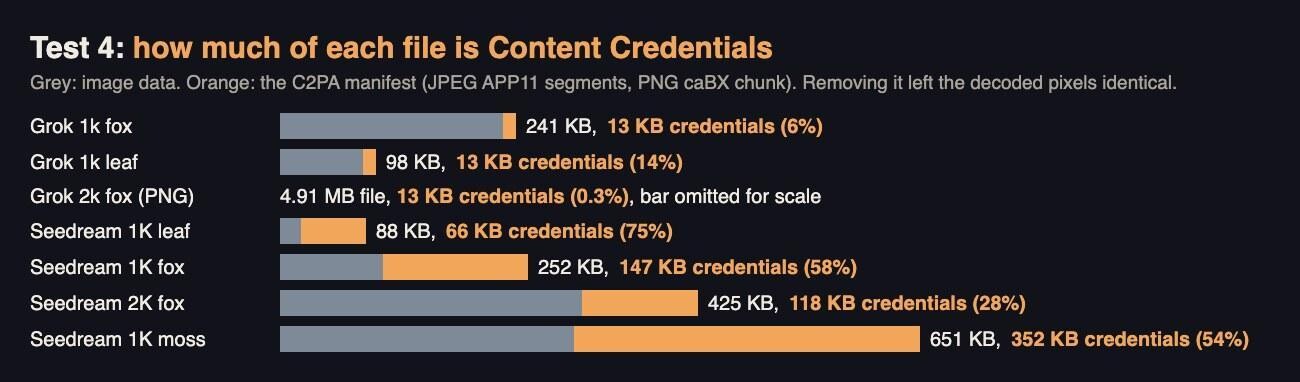
On a flat 1K illustration, three quarters of the Seedream file was the credentials manifest.
The sizes are very different. Grok’s manifest was about 13 KB in every file. That is 6% of a typical 1k JPEG and 0.3% of a 2k PNG. Seedream’s manifest varied from 66 KB to 352 KB and grew with the busyness of the picture, which fits an embedded thumbnail. On the flat leaf illustration, 66 KB of an 88 KB file was manifest. On the 1K fox it was 147 KB of 252 KB. That explains Test 1: Seedream’s 2K fox was mostly image, and its 1K fox was mostly manifest.
We removed the APP11 segments from seven JPEGs with a byte-level script that rewrote nothing else. In all seven, the decoded pixels were identical before and after. The Seedream 1K fox dropped from 252 KB to 105 KB. The flat leaf dropped from 88 KB to 22 KB.
Whether you should strip the manifest is a policy decision, not a compression trick. The credentials let others verify the file’s AI origin. Fernhollow chose to keep them in its master archive and in the paid packs, where honest labelling matters to schools. It strips them only from small web previews, and each product page states that the illustrations are AI-generated. Make a deliberate choice and write it down. Do not let an image optimiser quietly make it for you.
Test 5: PNG, JPEG and re-encoding for hosting
A file format choice compounds across every download. The Grok Imagine API gives you no format control: you get JPEG at 1k and PNG at 2k. Seedream lets you ask. We requested the fox at 1.5K as PNG and compared it with the 1.5K JPEG from Test 1. Both cost $0.0263 and both took about a minute. The PNG was 4.33 MB. The JPEG was 316 KB.
Then we took Grok’s 2048 x 2048 PNG and re-encoded it locally with Pillow, to see what a hosting step would produce:
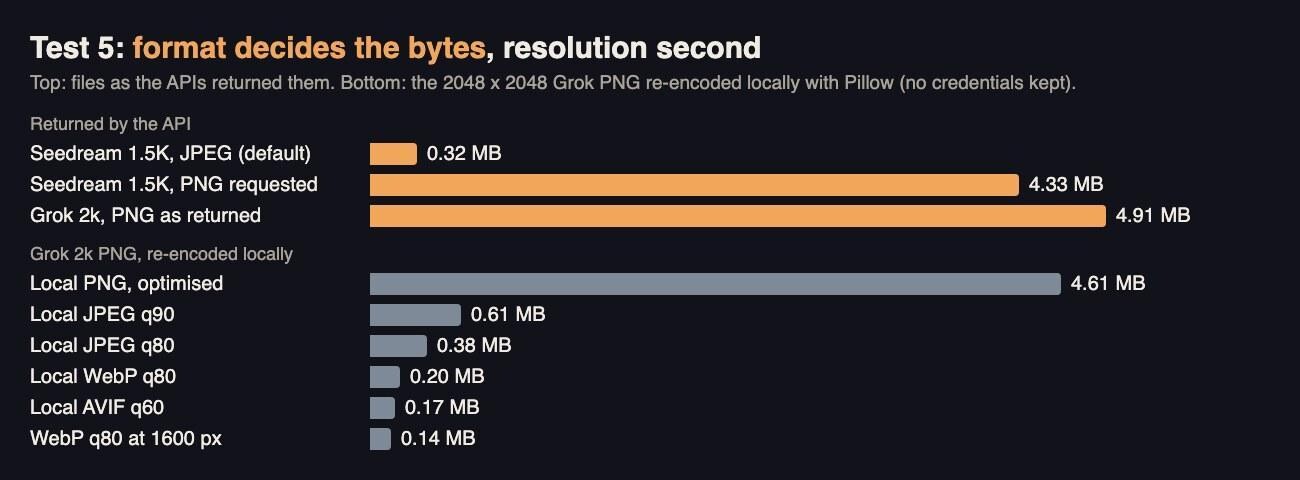
The 4.91 MB PNG became 0.20 MB as WebP and 0.17 MB as AVIF at full size. Re-encoding does not keep the credentials unless your tool copies them.
- Optimised PNG: 4.61 MB, a 6% saving. Lossless compression barely helps on painterly images.
- JPEG quality 90: 0.61 MB. JPEG quality 80: 0.38 MB.
- WebP quality 80: 0.20 MB. AVIF quality 60: 0.17 MB.
- WebP quality 80 resized to 1600 pixels: 0.14 MB, enough for a product page preview.
Fernhollow’s rule is now simple. Keep the API file as the master, untouched and with its credentials. Ship a JPEG at quality 85 to 90 in the printable pack, because every school computer opens it. Serve WebP or AVIF previews on the website. The PNG is only worth keeping when someone will edit the file again.
Test 6: How much the subject changes the file
Storage planning usually uses one average file size. We generated four very different subjects on both models at 1024 x 1024: a flat vector leaf, a pencil line drawing of a snail, a night sky full of stars and a macro photograph of wet moss.
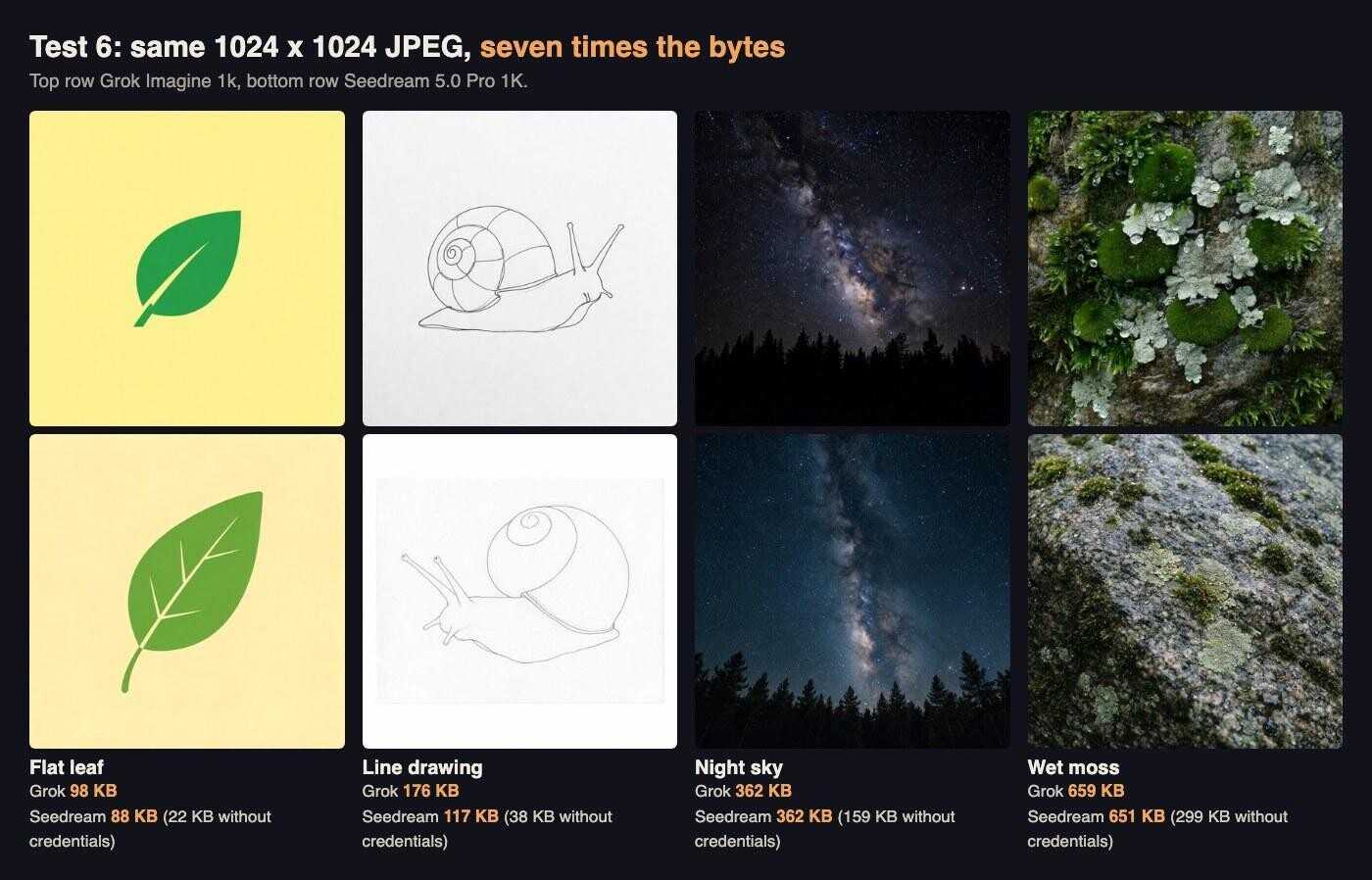
Same dimensions, same format and same price, from 88 KB to 659 KB.
On Grok the files ran from 98 KB for the leaf to 659 KB for the moss, a 6.7-fold spread. On Seedream they ran from 88 KB to 651 KB. Without the credentials manifest, the Seedream range was 22 KB to 299 KB, so its real image data was compressed much harder than Grok’s.
For Fernhollow this changes the budget. A pack of 40 flat colouring-style cards is a few megabytes. A pack of 40 photographic nature close-ups from the same model is five to seven times heavier. Estimate pack size from a sample of the actual subject, not from a single test image.
The Seedream 5.0 Pro API took between 35 seconds (the moss) and 52 seconds (the line drawing) on these four subjects, while Grok took 6 to 13 seconds. The timing did not follow detail, and with one image per subject we would treat the spread as noise.
Test 7: Batches and what they are called
Packs are batches, so we tested how each model returns several images. Grok Imagine accepts n up to 10. We asked for four 3:4 bird cards in one request:
Watercolour illustration of a garden bird perched on a thin branch, for a set of printable classroom picture cards, white margin, no text.
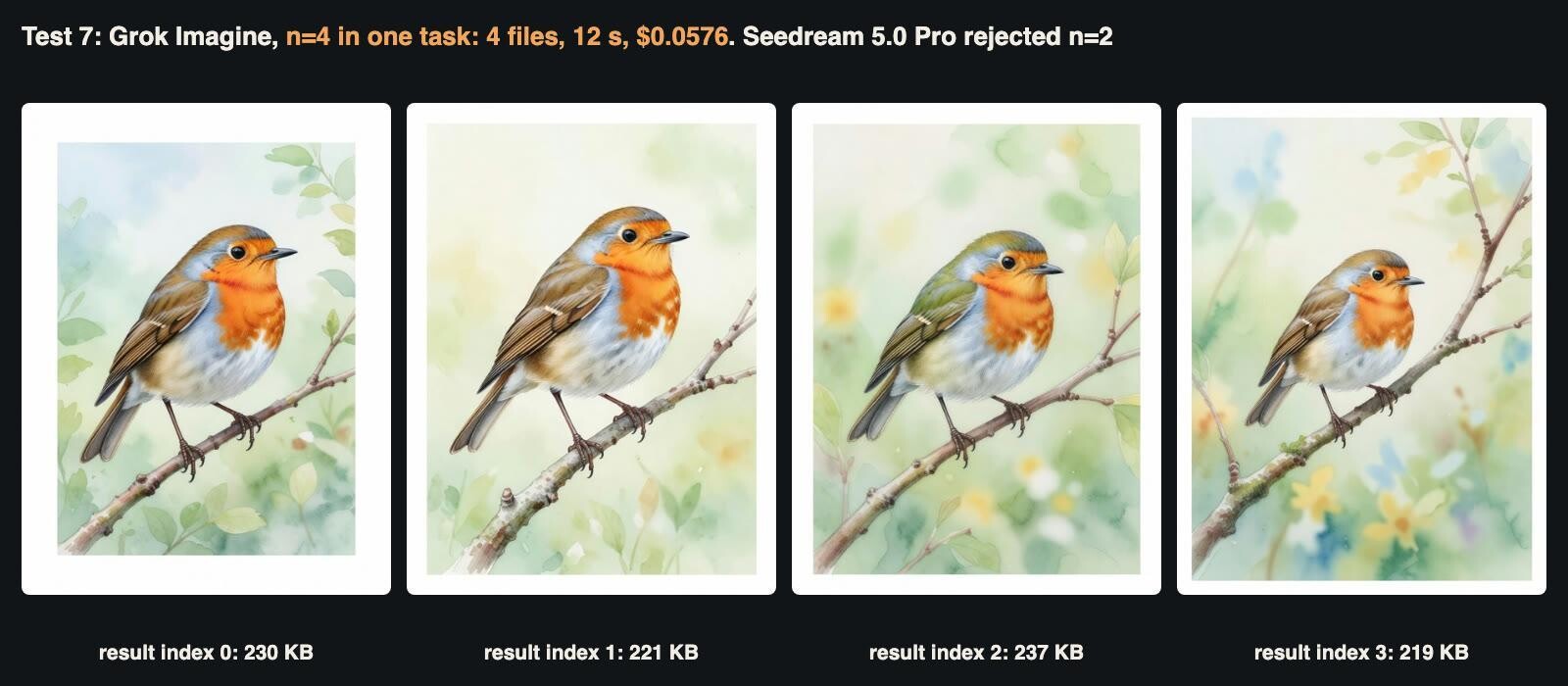
One task, four files, four slightly different robins.
The task finished in 12.1 seconds and cost $0.0576, exactly four times the single-image price. The result held one entry with a list of four URLs. The file names ended in the task ID followed by _0 to _3. All four were 864 x 1152 JPEGs between 219 and 237 KB. That naming suits machines, not teachers, and every single-image result ends in _0.
Seedream 5.0 Pro makes one image per request. We sent n: 2 anyway to see the failure. The API rejected it at once with HTTP 400 and a clear message that n must be 1, and created no task. For Seedream batches you submit several tasks in parallel. Our runs kept up to six tasks in flight at once, across both models, without a single failed task.
Test 8: An edit is a new file, not a patched one
Teachers ask for small changes, so Fernhollow edits existing cards. We uploaded each model’s 1k fox through the upload endpoint, which returns a public URL. We passed that URL in image_urls with the same instruction to both models:
Add a small red knitted scarf around the fox’s neck. Keep everything else in the picture exactly the same.
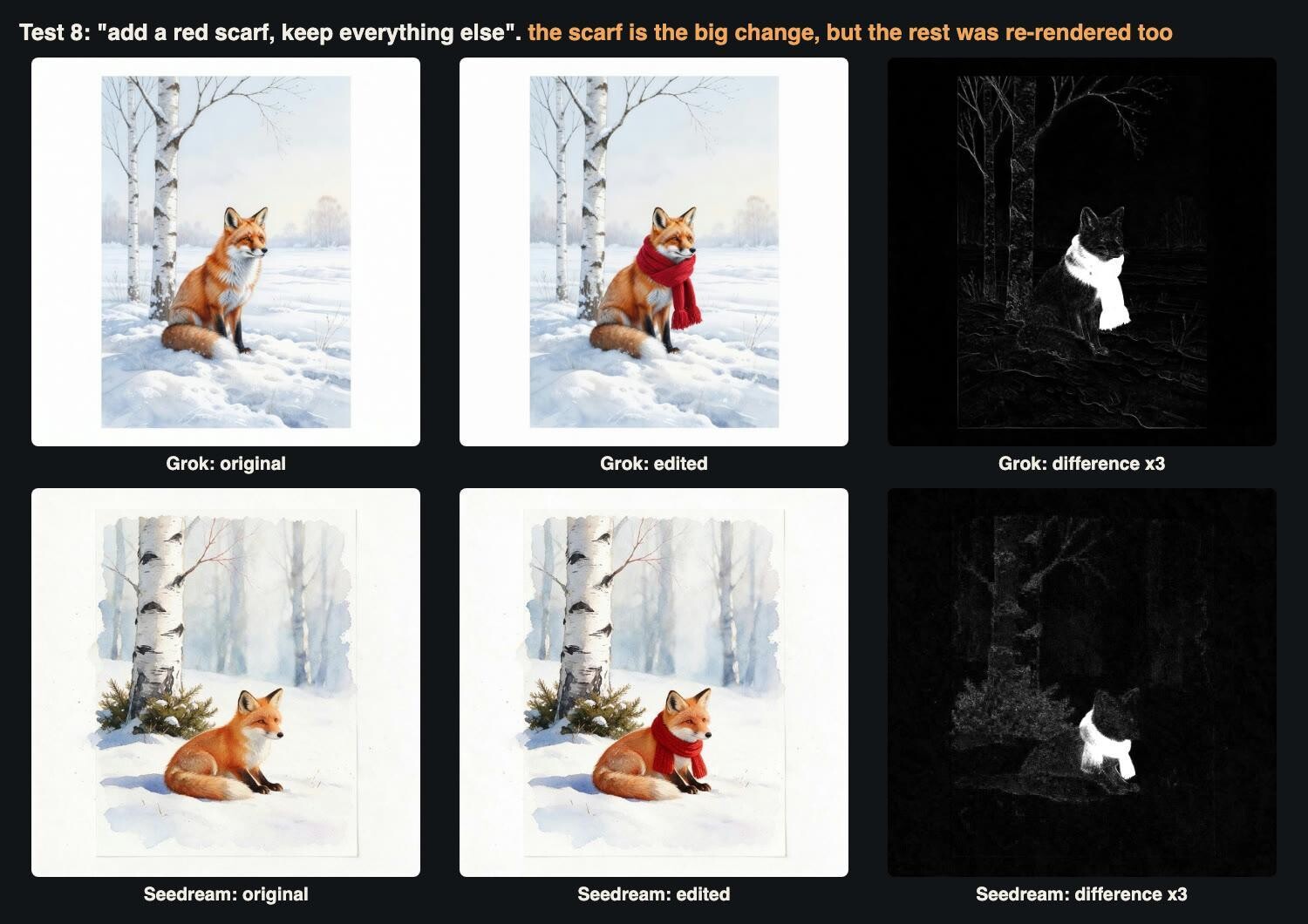
The bright shape in each difference map is the scarf. The faint texture around it shows the rest of the picture was redrawn slightly.
Both edits did what was asked, and both kept the composition. The Grok edit took 12 seconds and cost $0.0158, which is the image price plus $0.0014 for the reference image. The Seedream edit took 123 seconds, the slowest task in our run, and cost $0.0263. Its first reference image is free. Both returned 1024 x 1024 JPEGs, the same size as the input. For Seedream that held with size: "auto" and no resolution set.
We compared each pair pixel by pixel. About 3% of pixels changed by more than 20 levels on a 0 to 255 scale, which is mostly the scarf. But 23% of Grok’s pixels and 40% of Seedream’s changed by more than 2 levels. The edit is a fresh render and a fresh JPEG, not a patch. For file management this means three things. An edit gets a new hash, a new file and a new manifest. It should never overwrite the original. If you chain edits, start each one from the best master, not from the last JPEG.
Test 9: Download, name, check and pack
Result URLs are temporary. The task response carries an expires_at timestamp, and the documentation tells you to copy results to your own storage. We checked the result URLs with HEAD requests after downloading. The servers sent a correct Content-Type and a Content-Length that matched our bytes exactly. They sent no Content-Disposition header, so a browser will save the file under the URL’s own long name. Schedule downloads from the expires_at value rather than assuming a fixed window.
Then we built a pack from every completed image in this test. This is the script we ran, unchanged. It takes the format from the file’s magic bytes, names each file from model, real pixel size, sequence and hash, writes a manifest and builds two ZIPs:
import json, hashlib, csv, zipfile, os, shutil
from PIL import Image
Image.MAX_IMAGE_PIXELS = None
M = json.load(open("meas.json"))
os.makedirs("pack", exist_ok=True)
rows = []
for i, (k, v) in enumerate(sorted(M.items()), 1):
    src = f"img/{k}{v['ext']}"
    b = open(src, "rb").read()
    sha = hashlib.sha256(b).hexdigest()
    ext = {"jpeg": "jpg", "png": "png"}[v["fmt"]]         # extension from magic bytes
    model = "grok" if v["model"].startswith("grok") else "seedream"
    name = f"fernhollow_{model}_{v['w']}x{v['h']}_{i:03d}_{sha[:8]}.{ext}"
    shutil.copyfile(src, "pack/" + name)
    rows.append(dict(file=name, model=v["model"], width=v["w"], height=v["h"], format=v["fmt"],
                     bytes=len(b), sha256=sha, cost_usd=v["cost"], test=k))
with open("pack/manifest.csv", "w", newline="") as f:
    w = csv.DictWriter(f, fieldnames=rows[0].keys()); w.writeheader(); w.writerows(rows)
for mode, comp in (("stored", zipfile.ZIP_STORED), ("deflated", zipfile.ZIP_DEFLATED)):
    with zipfile.ZipFile(f"pack-{mode}.zip", "w", comp) as z:
        for r in rows: z.write("pack/" + r["file"], r["file"])
        z.write("pack/manifest.csv", "manifest.csv")
The meas.json it reads came from our measurement step: format from magic bytes, pixel size, model and charged cost for each file.
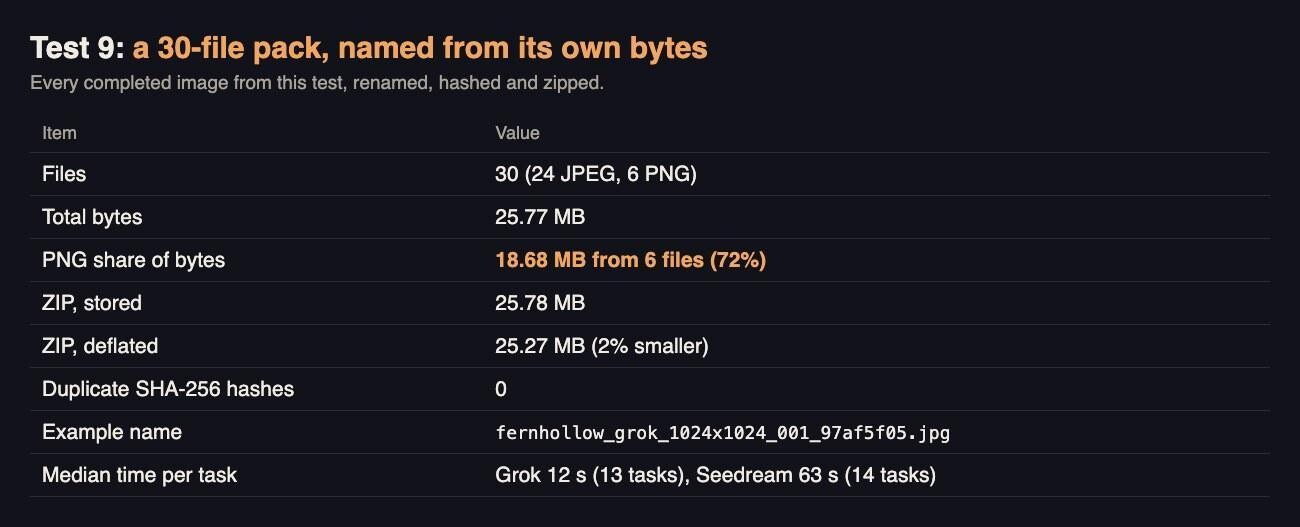
Deflate saved 2%. Six PNG files were 72% of the pack.
The 30 files came to 25.77 MB. Deflate compression made the ZIP only 2% smaller than storing the files, because JPEG and PNG are already compressed. The JPEGs shrank by between 2% and 37% each, and the PNGs by under 1%. Six Grok 2k PNGs made up 18.68 MB, or 72% of the pack. No two files shared a SHA-256 hash, so nothing was duplicated, but the manifest lets Fernhollow check that on every future pack.
What it cost
| Test | Completed images | Cost |
|---|---|---|
| 1. Default square tiers (2 Grok, 3 Seedream) | 5 | $0.13 |
| 2. Ratios (5 Grok, 3 Seedream) | 8 | $0.15 |
| 3. Exact sizes (1 rejected, not charged) | 2 | $0.08 |
| 4. Credentials analysis | 0 (reused files) | $0.00 |
| 5. Seedream PNG request | 1 | $0.03 |
| 6. Four subjects on both models | 8 | $0.16 |
| 7. Grok batch of four (Seedream n=2 rejected, not charged) | 4 | $0.06 |
| 8. Edits | 2 | $0.04 |
| 9. Download, manifest, ZIP | 0 | $0.00 |
| Total | 30 files from 27 tasks | $0.65 |
Grok’s 13 tasks cost $0.23 and Seedream’s 14 cost $0.42. Rows are rounded. Prices on both pages vary by member tier and may change.
A checklist for generated image files
- Sniff the format from the first bytes. On Grok Imagine the format changed with resolution: JPEG at 1k, PNG at 2k.
- Record real pixel dimensions. Grok’s 2k was 4.2 to 4.5 megapixels in every ratio, so 2816 x 1584 at 16:9, not 2048 wide.
- Use exact sizes on Seedream 5.0 Pro for fixed slots, and stay inside its pixel limits. 1920 x 1080 cost the same as 1K.
- Decide on C2PA Content Credentials on purpose. They were 13 KB per Grok file and up to 352 KB per Seedream file, and re-encoding drops them silently.
- Keep the API file as the master. Ship JPEG in downloads and WebP or AVIF on web pages. A 4.91 MB PNG became 0.20 MB as WebP.
- Budget storage by subject. The same size and format varied almost sevenfold.
- Store every edit as a new file with a new hash. Edits are re-renders.
- Download before
expires_at, rename from content, write a manifest with hashes, and do not expect ZIP to shrink images.
The bottom line
Seen as files, the two models behave like different suppliers. Grok Imagine is fast, typically 12 seconds against Seedream’s minute. It is cheap per image, the same price at both resolutions, and it batches up to ten images in one task. But its 2k output arrives as multi-megabyte PNG, and it gives you no format or exact-size control. Seedream 5.0 Pro is slower and costs more at 2K. In return it delivers compact JPEGs by default, lets you choose PNG, hits exact pixel sizes, and carries much heavier provenance metadata.
For Fernhollow, the answer was not one model. It was a file pipeline that does not trust labels. Sniff the format, measure the pixels, choose what happens to the credentials, re-encode for delivery and name every file from its own content. Our sample was small, one image per condition in most tests, so run the same checks on your own subjects before you set storage budgets. The measuring costs nothing once the files are on disk.