
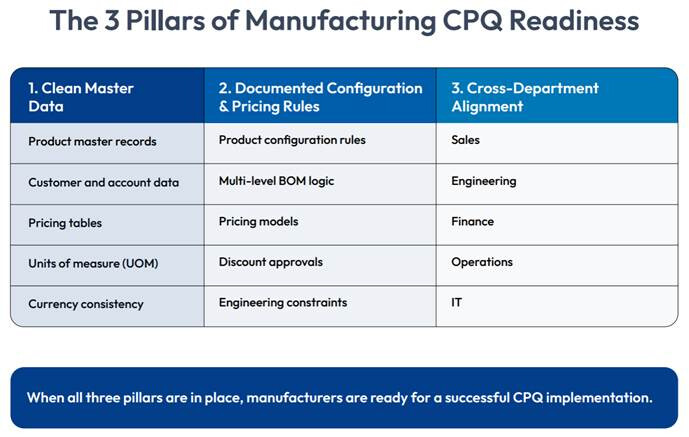
A manufacturer is ready for CPQ when its product rules are fully documented and its ERP and CRM integration points are mapped before a single line of configuration code is written. CPQ readiness is not a software decision. It’s an operational state built on three pillars: clean master data, documented pricing and configuration logic, and cross-departmental alignment between sales, engineering, and finance. Skip any one of these, and even the best configure price quote system deployment can fail.
This CPQ readiness checklist walks you through exactly what “ready” looks like at each stage, so you can audit your organization honestly before you sign a CPQ contract.
Why CPQ Readiness Determines Deployment Success
Most manufacturers don’t fail at CPQ because they chose the wrong vendor. They fail because they configured a modern quoting system on top of an unprepared foundation. Also, poor product master data quality is consistently identified as a leading cause of implementation delays, highlighting the importance of a strong data foundation.
A manufacturing sales transformation built on CPQ succeeds when the groundwork is laid before implementation starts, not after.
Is Your ERP and CRM Data Structurally Ready for a CPQ Implementation?
Your CPQ solution is only as accurate as the ERP data it relies on. Before evaluating vendors, run a structural audit across four areas:
- Product master data: Every SKU, variant, and option should have one authoritative record. Duplicate or conflicting product entries are the single most common cause of pricing errors after go-live.
- Pricing tables: Discount structures, cost tiers, and margin rules need to be in one system of record, not scattered across spreadsheets maintained by individual sales reps.
- Customer and account data: CRM records need to be clean enough so that CPQ can pull accurate account, contract, and entitlement information without manual intervention.
- Unit of measure and currency consistency: Manufacturers selling internationally often carry inconsistent UOM conversions between plants. These need to be standardized before integration, not fixed inside the CPQ tool.
Cincom CPQ synchronizes rule-based configuration data directly with ERP and CRM systems, but that synchronization only works well when the source data has already been normalized. Run the audit first.
How to Map Multi-Level Bill of Materials (BOM) Logic Before Buying CPQ Software
Manufacturers selling configured, engineered, or modular products almost always carry multi-level BOMs, where a parent assembly depends on sub-assemblies, which in turn depend on individual components. Before CPQ implementation, this logic needs to be mapped and validated.
Here’s how to approach it:
- Document every configurable product line and identify which ones use multi-level BOMs versus flat, single-level structures.
- Document dependency rules between parent and child components. If selecting Option A on the parent assembly requires a specific sub-assembly, that rule needs to be written down, not held only in an engineer’s head.
- Flag mutually exclusive and required combinations. Configuration errors most often come from missing “if X, then not Y” logic that engineering knows intuitively but has never formalized.
- Validate against real historical quotes. Pull 20–30 past orders and confirm that the documented BOM logic would have produced the same valid configuration. Discrepancies here are your readiness gaps.
Building Cross-Departmental Alignment Before Rollout
Data and rules are only two-thirds of readiness. The third pillar, alignment between sales, engineering, and finance, is where many otherwise well-prepared manufacturers still stumble. Before implementation:
- Sales and finance agree on discount approval thresholds, so pricing rules built into CPQ match what’s actually enforced day to day, not an outdated policy document.
- Engineering signs off on which configuration rules are hard constraints versus guidelines sales can override with approval.
- A single executive sponsor owns the rollout across departments, so configuration decisions aren’t made in silos and then contested after launch.
- Everyone agrees, in writing, on what success looks like before the project starts. This makes the difference between a smooth adoption and a system people quietly work around.
Setting Quote Cycle Time and Accuracy Benchmarks Before Go-Live
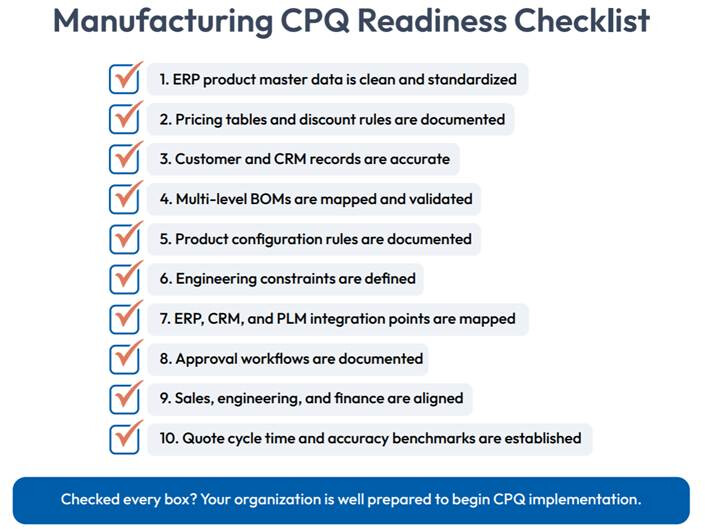
CPQ software doesn’t reduce quote cycle time on its own; readiness does, and you can’t tell whether readiness worked if you never defined what “better” meant beforehand. Before go-live, establish baseline numbers for:
- Current average quote turnaround time, measured from initial customer request to delivered quote
- Current quote error rate, including how often quotes require rework after submission
- Current discount approval cycle time, especially for quotes requiring finance sign-off
Baseline metrics are how you’ll know, 90 days post-launch, whether your readiness work actually paid off.
Conclusion
CPQ readiness isn’t a milestone you reach once and move past. It’s the discipline of keeping product rules, pricing logic, and system integrations accurate as your product lines and sales processes evolve. Manufacturers who treat this checklist as a one-time pre-launch exercise often find themselves right back where they started six months after go-live, patching the same gaps that should have been fixed before implementation. Get the foundation right, and CPQ becomes what it’s meant to be: a faster, more accurate path from configuration to quote to closed deal.
Frequently Asked Questions
What are the signs that a manufacturing company is finally ready to implement CPQ software?
A manufacturer is ready for CPQ when product rules, BOM logic, and pricing policies are documented, ERP and CRM data is clean, and integration points are mapped. Cross-functional alignment between sales, engineering, finance, and operations is also essential.
How do you prevent implementation failures when migrating to an automated quoting platform?
Start with a master data audit, document product and pricing rules, map ERP, CRM, and PLM integrations, and train users before deployment. Proper preparation reduces implementation risks and improves adoption.
How does a company map out multi-level Bills of Materials (BOM) for configuration software?
Document parent-child relationships, configuration dependencies, required and optional components, and manufacturing constraints. Then convert these rules into configuration logic that the CPQ engine can validate automatically.