
What makes a Halloween wallpaper work well on your phone or desktop?
A genuinely good seasonal background does much more than look impressive as a standalone illustration. Once you put the artwork on a real device, things like the clock, app icons, the taskbar, or desktop shortcuts can easily cover vital parts of the image.
You must therefore make sure your character is positioned beautifully in the absolute center of a full illustration. Otherwise, they might end up sitting directly behind your phone’s digital clock face.
That’s why the best Halloween wallpaper ideas always start with the specific screen they are meant for.
A portrait wallpaper gives you a tall, narrow canvas, allowing your character to fit perfectly in your phone’s screen. On the flip side, a desktop background gives you considerably more horizontal space.
With that in mind, here are 5 great Halloween anime wallpaper ideas that you can easily adapt to different screens without turning your final composition into a cluttered mess.
Phone and Desktop Need Different Compositions
Before you settle on a specific Halloween scene, think about exactly where it will show up.
A standard phone wallpaper almost always uses a tall portrait composition. Your character or main focal object needs enough vertical breathing room to stay clearly visible, and your most important facial details should stay away from areas that might get covered by your lock screen clock or notification interface.
On the other hand, desktop wallpapers give you a wide landscape canvas to play with. You can place your main character on one side of the screen and let the spooky environment extend beautifully across the rest of the canvas. This strategy works especially well when your desktop has a mountain of icons on one side.
The truth is, no single magic wallpaper size works perfectly on every phone or monitor. Aspect ratios, screen resolutions, interface layouts, and automatic cropping behavior vary wildly between different devices.
The overall composition of the artwork matters much more than generating a massive image and hoping it fits your screen.
For a mobile phone, you might want to keep the primary focal point right around the upper middle portion of the image with relatively quiet space surrounding it.
On a desktop monitor, you can shift your character to the right and leave a darker, less detailed area on the left for your shortcuts.
Five Halloween Wallpaper Ideas
The absolute easiest way to make these design concepts work as functional wallpapers is to give every single scene a crystal-clear focal point. You also need to leave a specific spot where your screen interface can sit comfortably without constantly fighting the artwork underneath.
- A Moonlit Rooftop Witch
Picture a lone anime witch standing on a totally quiet urban rooftop beneath a massive autumn moon.
She could wear a dark pointed hat and a flowing cloak, holding a small glowing lantern or an open spellbook. A few bats and drifting autumn leaves can add movement to the canvas without filling the entire sky.
If you are designing this for a phone screen, you can place the witch slightly below the upper third of the frame. Let the large moon and open night sky extend well above her head. That layout gives the wallpaper a strong focal point while still leaving relatively quiet space around your lock screen clock.
For a desktop monitor layout, you should move the witch toward one side of the final composition and let the moonlit city stretch all the way across the remaining width.
Your main focal point here will be the witch silhouetted directly against the moon. Keep the quiet area the open night sky or a darker, simpler section of the rooftop.
2. A Glowing Pumpkin Street
Instead of placing one massive pumpkin in the middle of your image, imagine a narrow old street lined with dozens of warm, glowing jack-o’-lanterns.
An original anime character could walk through the scene, carrying their own small pumpkin lantern. The warm orange light spilling from the shop windows and the pumpkins creates a beautiful contrast against the deep blue evening sky.
If you are setting this up for a mobile phone, your character can occupy the lower middle portion of the frame while the narrow street recedes upward into the background. This creates a really natural vertical composition that draws the eye in.
For a desktop monitor, you can extend the street horizontally and place your character slightly off center. Just keep one side of the street relatively quiet if that’s where your desktop icons normally sit.
Your primary focal point will be the character carrying that glowing lantern. Your quiet area will be a darker section of the pavement, an empty wall, or a patch of sky away from the main light sources.
3. A Vampire Manor
A vampire-themed wallpaper works particularly well when the environment does most of the heavy lifting for the atmosphere.
Imagine an elegant anime vampire standing on the stone balcony of an old manor, with tall gothic windows glowing faintly behind them. A full moon, some bare trees, and distant rolling mist easily establish the Halloween setting without requiring dozens of random decorative objects scattered around.
If you are setting this up for a phone, you can frame the character from the waist or shoulders upward. Use the manor’s grand architecture to create natural vertical lines directly around them.
For a desktop monitor, widen the scene so the manor stretches beautifully across the background. Place the vampire toward one side of the canvas, leaving the opposite side relatively open and clean.
Your main focal point will be the vampire on the balcony. Your quiet area will be the dark sky or a highly restrained section of the manor exterior wall.
4. A Misty Shrine With Friendly Ghosts
If you want something a bit less gothic, go with an old traditional shrine surrounded by soft evening mist.
An original anime character could stand near the shrine steps while several small, friendly ghost spirits float lazily nearby. Use a pale blue-white lighting effect for the ghosts to make them stand out beautifully against a darker, deeper forest background. You want to make sure the ghosts as simple shapes, not a collection of competing characters.
On a phone screen, place the main character and the shrine slightly below the center mark. Let the floating mist and dark trees provide plenty of visual breathing room up above.
For a desktop layout, place the shrine toward one side of the frame and let the forest extend into the remaining horizontal space. A darker patch of trees on one side can provide a useful area for your desktop icons without them getting lost.
Your primary focal point will be the character and the shrine entrance. Your quiet area will be the misty sky or the darker forest space.
5. A Cozy Haunted Room
A great Halloween wallpaper doesn’t have to be dark and frightening to capture the mood.
Imagine a warm anime bedroom or a cozy reading room decorated for the season. You could have a small pumpkin on a wooden desk, candles glowing softly beside a stack of old books, autumn leaves resting on the windowsill, and a sleepy black cat curled up in a comfortable chair. Outside the window, a full moon and a few distant bats fly across the sky.
If you are setting this up for a mobile phone, let the window, along with the main character or the cat, provide the primary vertical focus. Keep the upper portion of the room relatively simple, so it stays clean.
For a desktop screen, widen the room and distribute the furniture naturally across the scene. Just keep the area where your desktop icons sit relatively quiet.
Your primary focal point will be the character, the sleeping cat, or the glowing window. Keep the quiet area a plain section of the wall or softly lit furniture.
Use Lighting and Negative Space
Halloween artwork can become incredibly crowded very quickly. It’s easy to start dumping pumpkins, candles, bats, ghosts, moons, haunted buildings, autumn leaves, magical effects, and elaborate costumes into almost any scene. But adding all of them doesn’t necessarily make the wallpaper more interesting.
In fact, smart lighting can do a lot of that heavy lifting for you.
A single glowing pumpkin can instantly draw attention to a nearby character. Moonlight can perfectly separate a dark silhouette from the background. A warm window can easily become the primary visual anchor of an otherwise dark room.
Negative space matters for the exact same reason. A relatively simple sky, a plain wall, some mist, or a deep shadow gives the eye somewhere to rest. It also makes the wallpaper much easier to use when your active icons or interface elements sit directly over it.
The main goal is to give your primary subject enough contrast so that it remains readable without turning every single part of the screen into another competing focal point.
A simple PixAI example
Suppose you want to create a portrait Halloween wallpaper for a mobile phone featuring an original anime witch.
You should start by deciding exactly where you want the character to sit before you even begin writing the rest of the prompt text. Instead of placing her directly in the center with a massive amount of busy detail surrounding her, position her slightly below the center mark. This leaves a beautiful, open moonlit sky stretching out above her head.
A starter prompt could look like:
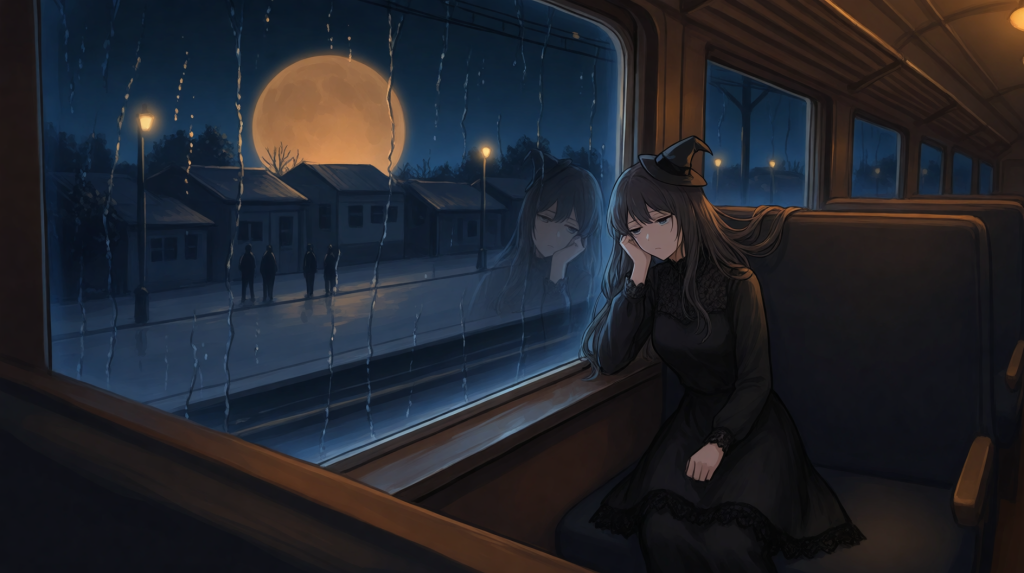
“Original adult beautiful young adult girl sitting alone by the window of an empty train at night, rain-streaked train window at night, tired expression reflected in the glass, wearing a black gothic Halloween dress with delicate lace, small black witch hat, long dark hair falling over her shoulders, sad distant expression, tired eyes, deserted town passing outside beneath an enormous amber moon, distant station platform with indistinct shadowy figures, cool blue exterior lighting contrasting with warm carriage lights, cinematic reflections, subtle supernatural unease, atmospheric anime film still, wide composition, character positioned on the right, town visible through the left window.”
The most important part of this process isn’t the costume choice or the Halloween setting itself. The prompt actually tells the generator exactly how the scene should be arranged structurally on your screen.
Once you have that framework, you can easily change the character’s hairstyle, clothing, color palette, facial expression, or setting while keeping the basic composition intact.
For example, the witch could easily become your own original avatar rather than a completely newly invented character. You might keep your avatar’s signature hairstyle and eye color while switching up the outfit style and atmospheric lighting specifically for Halloween.
PixAI works perfectly for this kind of image generation workflow. It lets you experiment with different artistic models and develop an original character through controlled variations. You can jump into the PixAI image generator whenever you are ready to build your own unique wallpaper.
Adapt the Scene for Another Screen
A mobile phone and a desktop computer don’t need the exact same image stretched to different dimensions.
Switching from portrait to landscape completely changes how much of the surrounding environment you can show and where your main focal point can sit. If you stretch a tall portrait composition into a wide landscape image, your character can end up awkwardly positioned or leave massive empty areas that were never meant to be part of the original design.
A much better approach is to actively adapt the composition itself.
The rooftop witch concept could easily transform into a wider, sweeping cityscape for a desktop monitor, where you move the character toward one side and give the glowing moon a lot more breathing room. The cozy haunted room layout could expand naturally to reveal more antique furniture and a larger window frame.
Sometimes a simple, clever crop is enough to get the job done. Other times, generating a completely separate version or using an image editor to extend the background canvas will give you a much cleaner result. The most important thing is to preserve your visual hierarchy as you change the canvas size.
Check It on the Device
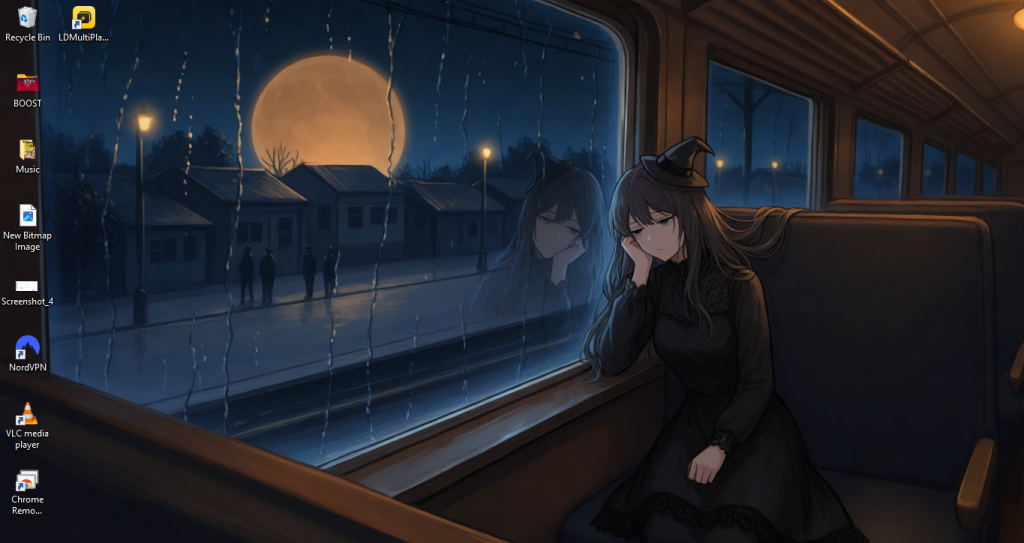
Before you commit to making the image your permanent wallpaper, preview it on the exact device you plan to use.
Take a close look at the image with your clock and icons fully visible. Is the character’s face completely hidden behind the digital clock display? Are important costume details sitting right underneath your main app icons? Does the absolute brightest part of the image actively compete with your screen text or other interface elements?
Make sure you check all the outer edges as well. A small detail that looks comfortably inside the frame in an image editor might get severely clipped once the device applies its own automatic wallpaper scaling or cropping.
It can also really help to view the wallpaper at a normal device size rather than zooming all the way into the original image file. Fine details that look incredible at full resolution can disappear on a compact phone screen. If something important gets covered up, move the subject, simplify the background right behind your interface, or crop the image differently.
Conclusion
A great Halloween wallpaper works best when your seasonal concept and your screen composition support each other.
You should pick one solid scene, decide whether you are designing for a portrait or landscape layout, and place your character safely before you start filling in the rest of the image.
From there, you can use PixAI to create a highly original Halloween anime wallpaper built around your character, favorite color palette, and preferred seasonal mood.
Always start with the specific screen you are actually going to use. Then you can comfortably build your perfect Halloween scene right around it.