
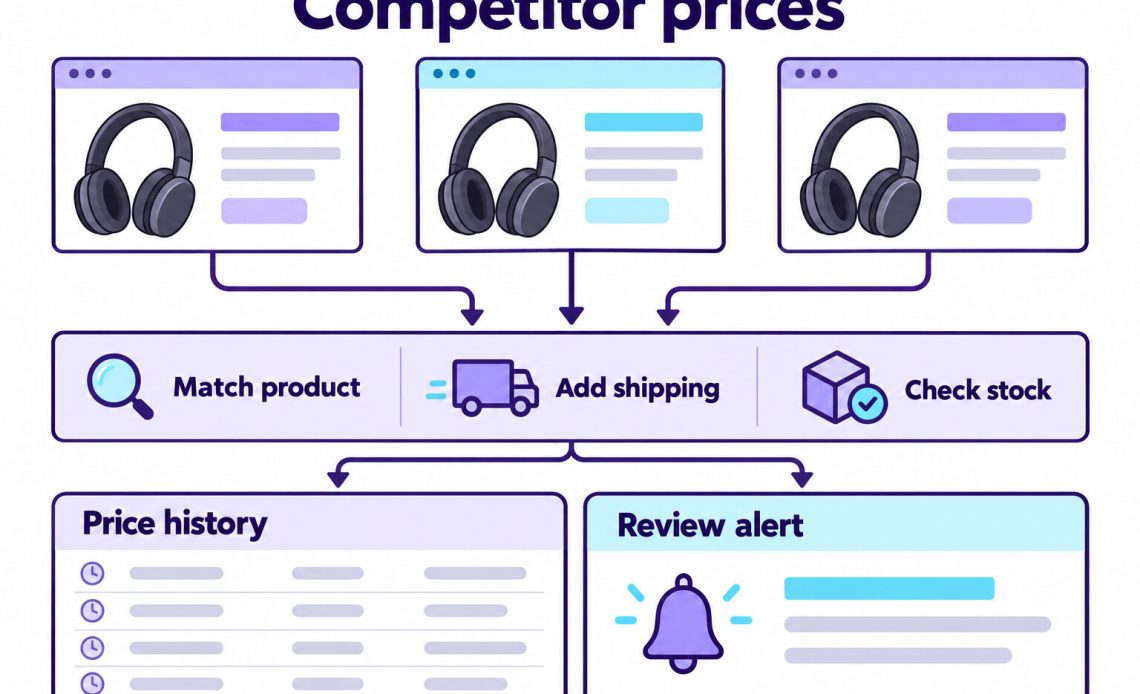
To monitor competitor prices automatically, build a watchlist of exact product matches, collect comparable offers on a schedule, and flag verified changes for review. The collection method matters, but matching the product and calculating the delivered price matter just as much. A fast monitor that compares different pack sizes will produce bad decisions faster.
For a small e-commerce team, the useful output is a short list of offers that deserve attention. Each alert should explain what changed, where it changed, and why the comparison is valid. You can then decide whether to adjust your price, change a promotion, or keep the offer as it is.
Build a Watchlist You Can Review
Start with a limited group of products and competitors whose offers overlap with yours. For example, a pilot might track 20 products across three stores. Those are planning numbers for a manageable test, rather than a recommended target for every retailer.
Choose products with meaningful sales, frequent promotions, or a clear role in customer comparisons. Then assign an owner to review alerts. Otherwise, the project can collect thousands of observations without changing a single decision.
For each item, record your product ID, the competitor’s listing, the selected variant, and the relevant market. Keep uncertain matches outside the active alert queue until someone approves them.
Match Products Before Comparing Prices
Compare the same model, variant, quantity, condition, and seller. A product title can suggest a match, but it may hide a smaller pack, an older model, or a refurbished item. Therefore, check the listing’s actual offer before adding it to the watchlist.
Use these fields to make the match review repeatable:
| Match Field | What to Confirm |
|---|---|
| Identity | Brand plus GTIN or manufacturer part number where available |
| Variant | Capacity, color, size, model revision, or other relevant option |
| Quantity | Single unit, multipack, weight, or volume |
| Condition | New, used, refurbished, or open-box |
| Offer | Seller, fulfillment method, and purchase requirements |
A SKU is a merchant’s own identifier, so matching SKU strings across stores proves little. A shared GTIN is stronger evidence, although the variant and quantity still need checking. Google’s Merchant Center guidance treats product variations as distinct items that require the correct identifiers.
When an offer changes seller or bundle contents, send it back for review. The old match should not automatically carry over to the new offer.
Compare the Delivered Price
Choose a consistent price basis before calculating a gap. For many online retailers, the useful measure is the delivered price for one destination and customer type. Record the tax basis explicitly, because an incomplete checkout estimate should not look like a complete total.
This hypothetical example compares the same product in one currency, before tax, for the same destination:
| Offer | Item Price | Shipping | Delivered Total |
|---|---|---|---|
| Your store | $79 | $0 | $79 |
| Competitor A | $69 | $9 | $78 |
| Competitor B | $74 | $0 | $74 |
Although Competitor A has the cheapest product price, Competitor B has the lowest delivered total. Its $74 offer is about 6.3% below your $79 offer. That difference determines which listing should trigger the undercut alert.
Also, separate public prices from membership, subscription, and coupon prices. Apply a discount only when your defined customer qualifies. If shipping is unknown, mark the total incomplete rather than assuming free delivery.
Choose Between a Monitoring Tool and Your Own Collector
Use a monitoring tool when its product matching, market settings, exports, and alerts fit your workflow. Before buying, test a sample of your actual listings and inspect the evidence behind each alert. A long feature list cannot show whether a tool understands your variants.
Build your own collector when you need control over source selection, stored fields, or business rules. However, include maintenance and review time in the budget. A source redesign can require new extraction rules even if your infrastructure works perfectly.
Check these collection routes in order:
- A permitted retailer feed or API with the required fields and update frequency.
- A monitoring service whose data rights and coverage fit the task.
- Permitted public-page collection for gaps the first two routes leave.
For page collection, product structured data can expose prices, currency, and availability. However, check that the markup describes the selected variant and matches the visible offer. When JavaScript loads the price later, the collector may need a browser; changing a proxy cannot repair an extraction rule.
Treat eBay Listings as Separate Offers
For eBay price monitoring, compare the same product, condition, seller, and buying format. An auction’s current bid is a different measure from a fixed-price offer. Consequently, keep them in separate comparison groups.
If an eBay API is suitable, check Browse API access requirements and whether your intended monitoring use is permitted before building around it. Production access and data-use conditions need separate review; a developer account alone does not settle them.
Also, keep the listing identifier and marketplace with each observation. An active asking price shows an available offer at collection time; it does not establish what buyers actually paid.
Automate the Collection and Alert Workflow
Automate a complete sequence from scheduled collection to reviewable evidence. For a team that reviews prices each morning, a daily job may be enough initially. Short promotions can justify another cadence, subject to source limits and the team’s ability to act.
Use this sequence for every scheduled run:
- Read the approved watchlist and its market settings.
- Collect the required offers through the chosen source.
- Check product identity, currency, stock, and price completeness.
- Append timestamped observations to the history store.
- Compare valid records with your current offer and the previous observation.
- Create or update alerts for the assigned reviewer.
Keep failures in a separate collection queue. A missing price must remain unknown, while a missing record must not become an out-of-stock claim. Similarly, store money as decimal values or integer minor units so rounding does not produce noisy differences.
For a lightweight pilot, a scheduler, a CSV or database history, and a daily summary can be sufficient. Save a job identifier with each run and reject duplicate observations when a failed job restarts. This prevents retries from looking like independent confirmation.
Keep Regional Prices in the Right Context
Hold the shopping context constant within each comparison. Delivery postcode, selected store, language, currency, cookies, and customer eligibility can all affect the offer. Therefore, an IP location alone cannot prove that two prices are comparable.
First set and record the delivery area. Then decide whether the task also needs a network route from that market. A feed that already supplies the required regional prices may meet the need without extra network infrastructure.
For independent public-page checks across required markets, IPnivo Residential Proxies provide a rotating residential option to evaluate. Test the returned offers and location availability with your collector before expanding. IPnivo supplies the route, while your workflow handles matching and price calculations.
Maintain separate histories for different markets. Otherwise, a switch from one delivery area to another can resemble a price change even when both local offers stayed constant.
Send Alerts That Support a Decision
Trigger an alert after the observation passes matching and completeness checks. Then apply a business threshold and attach enough context for someone to verify the offer. Keep a price-change alert separate from an undercut alert: a competitor can remain cheaper without making another change.
For the hypothetical $79 versus $74 example, a pilot could flag an in-stock offer at least 5% and $3 below yours. Require confirmation in two distinct scheduled observations with the same seller, variant, and market. Both sample thresholds are met, but a changed shopping context should postpone the alert.
Calculate the percentage gap as (your total - competitor total) / your total × 100. Choose thresholds that fit your category and margin rather than copying those example values. If your reference price is missing or zero, send the comparison for review instead of calculating a percentage.
Each alert should contain the product, market, previous and current competitor total, your total, timestamp, and a route back to the source evidence in your monitoring system. Deduplicate unchanged alerts so reviewers can focus on new information. During the pilot, keep price changes subject to human review.
Check Quality Before Expanding
Run the first watchlist for a week and inspect a sample every day. Count false matches, missing fields, useful alerts, and reviewer time. Those measures show whether automation is reducing work or moving it into cleanup.
Use these symptoms to select a repair:
| Symptom | Check First | Response |
|---|---|---|
| Prices suddenly become zero | Missing-value conversion | Restore unknown values and reprocess |
| One listing becomes much cheaper | Variant, quantity, and condition | Suspend its alerts and recheck the match |
| Currency changes | Market and delivery settings | Restore the context and separate the history |
| Many prices disappear | Page template or source response | Inspect samples before changing infrastructure |
| HTTP 403 or 429 | Access conditions and request schedule | Pause and review the permitted collection route |
If regional access affects the pilot, IPnivo’s market research proxy guide offers a framework for checking location, traffic, and usable output. Evaluate those costs alongside software and review time.
Expand the watchlist when an owner can open an alert, verify the comparison, and decide what to do without rebuilding the evidence manually.